
Projects and tenders
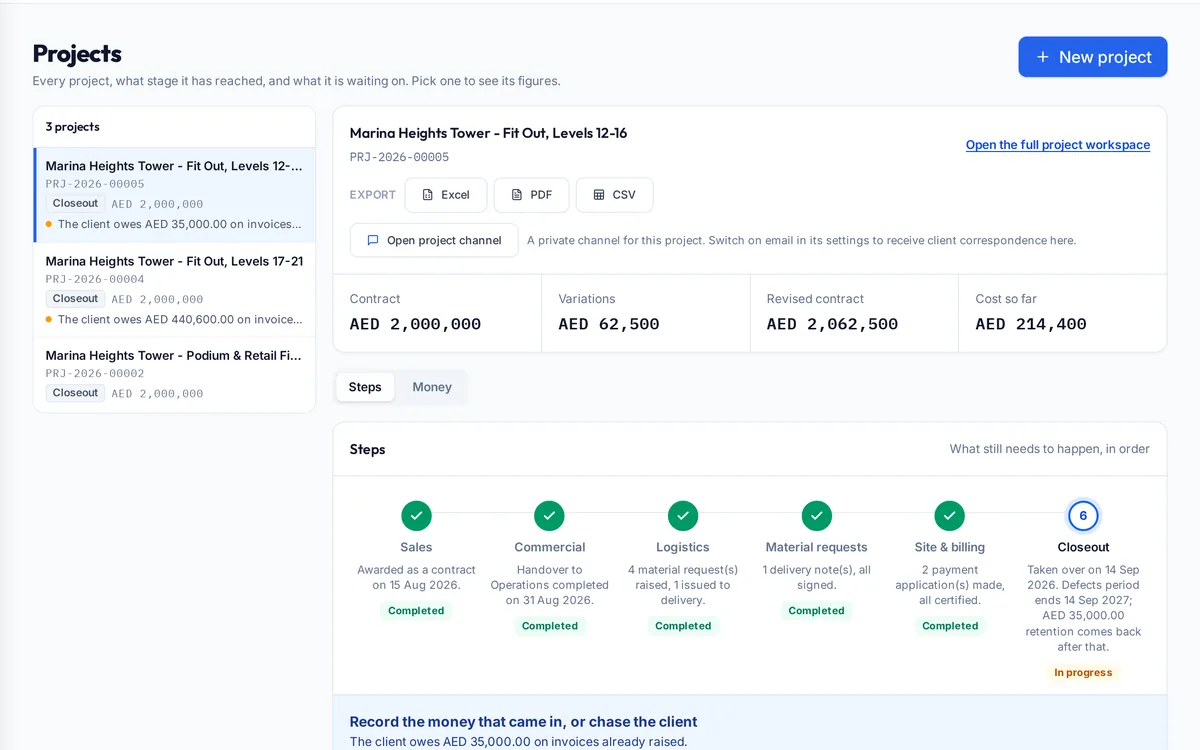
The projects and tenders module follows each job from the client's inquiry to closeout. It holds the inquiry, quotation and award, the costing sheets the job is measured against, the payment terms, the stages the project has reached and what it is waiting on, and shows contract value, variations, cost so far and money owed on one screen.
What it handles
| Feature | What it does |
|---|---|
| Inquiries and quotations | Scope, items, supplier quotes and landed prices before award |
| Award | The client's acceptance, contract value and divisions |
| Costing sheets | Commercial and quantity surveying budgets, versioned on variation |
| Payment terms | Advance, progressive, retention, guarantees and payment method |
| Project stages | Sales, commercial, logistics, materials, site and billing, closeout |
| Money tab | Worth, claimed, agreed, invoiced, received and owed now |
| Project channel | A private chat per project |
How a typical month runs
An inquiry arrives and the estimator logs its items, collects supplier quotes and builds landed prices. Once the client awards the job, commercial records the award and the contract value, the quantity surveyor builds the costing sheet, and the payment terms are entered: the advance and its recovery rate, retention, guarantees and how the client pays. From then on the project screen shows which stage the job has reached and what it is waiting on, and the money tab shows what it is worth, what has been claimed and certified, what has been invoiced and received, and what is owed now. When the client agrees a change, the variation updates the contract value and raises the costing sheet version, so the budget always matches the contract.
Rules it enforces
- A variation raises the costing sheet's version instead of creating a second sheet.
- Payment terms recorded on the project drive every invoice's retention and advance recovery.
- Each project sees only the people given access to it.
Where it connects
Read the tendering guide and the interim payments guide. It shares its records with the other areas: supply and logistics, site stores, quality and handover, interim payments, approvals, payroll and wps, time and attendance, finance and vat, banking and budgets, assets and documents. See the construction ERP overview or book a demo.
Questions people ask
Who uses this part of SupaJack Construct?
Mostly estimators, project managers and the commercial team, each seeing only what their role allows. Managers also see its figures in the project and dashboard views, so nobody keeps a separate copy.
What does it replace?
Usually a spreadsheet or a separate tool kept beside the accounts. Because it shares records with the rest of SupaJack Construct, its figures and the ledger cannot drift apart.
Can I see what a project is waiting on?
Yes. Each stage shows its status and what still needs to happen.
Where are variations recorded?
On the project, raising the contract value and the costing sheet version.
Is it a separate product?
No. It is part of SupaJack Construct and shares its records with every other area.
Does it work on a phone?
Yes, in any browser, with nothing to install.
Can access be limited by role?
Yes. Admins decide what each role can see and do.
How is it priced?
By quote, based on company size and the modules you use.